SD Card Installation
Step-by-step guide to install a Garmin map downloaded from this site onto a micro-SD card.
Prerequisites
Micro-SD card
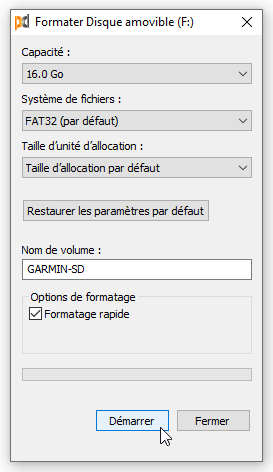
Use a blank or freshly formatted micro-SD card (min. 8 GB — max. 32 GB).
Procedure
1. Download the map
Go to the Downloads page and download the desired map(s).
Files are in .img format, named according to the convention:
IGN-BDTOPO-D038-v2026.03.img     ← department (Isère)
IGN-BDTOPO-LA-REUNION-v2026.03.img  ← overseas territory
IGN-BDTOPO-FRANCE-SE-v2026.03.img   ← France quadrant
2. Rename the file
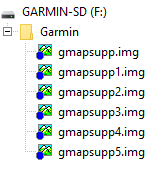
Garmin devices only accept files named gmapsupp.img, gmapsupp1.img, gmapsupp2.img, etc.
Rename the downloaded file to gmapsupp.img before copying it to the SD card.
3. Create the Garmin folder and copy the file
Create a folder named Garmin at the root of your micro-SD card (if it doesn't already exist), then copy the renamed file into it.
Exact location
The gmapsupp.img file must be located in Garmin/ at the root of the SD card, not in a subfolder.
4. Insert the card into the device
Remove the micro-SD card from your reader and insert it into your Garmin device.
5. Activate the map
After these operations, verify that the map is active in your GPS: Settings > Map > Map Information.
Installing multiple maps
It is possible to install multiple maps simultaneously on your Garmin device.
To do this:
- Download the additional map.
- Rename the downloaded
.imgfile by suffixing it:gmapsupp1.img,gmapsupp2.img, etc., depending on the number of maps already present in theGarmin/folder of your SD card. - Copy this file to the
Garmin/folder on your micro-SD card.
Mandatory naming
Garmin devices only recognize files named gmapsupp.img, gmapsupp1.img, gmapsupp2.img, etc. A file with any other name (e.g. IGN-BDTOPO-D038-v2026.03.img) will not be detected.
Comments
Comments are managed by Comentario,
self-hosted at comentario.allfabox.fr. Posting a comment may set a session cookie.