The Production Pipeline
This section describes step by step the complete process of creating a Garmin topographic map from IGN BD TOPO data. Each step is illustrated with the actual commands to run.
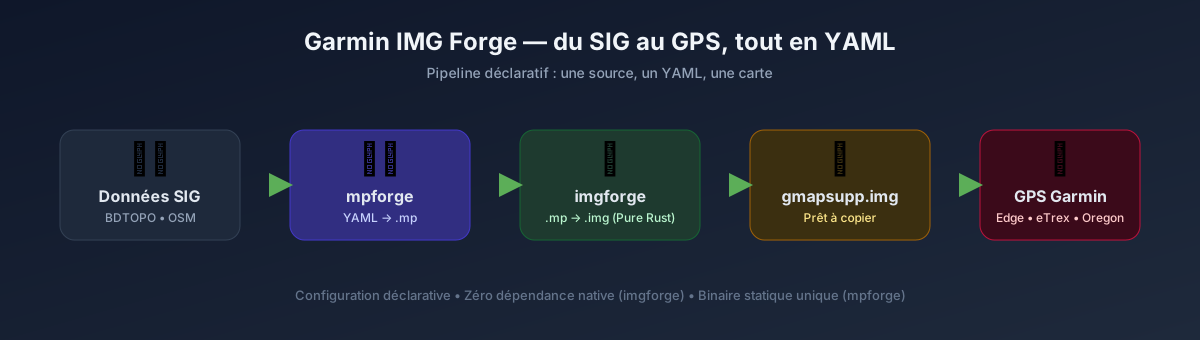
Overview
flowchart TD
    A["1. Download<br/>BD TOPO IGN + OSM"] --> B["2. Configuration<br/>YAML + field mapping"]
    B --> C["3. Tiling<br/>mpforge build"]
    C --> D["4. Compilation<br/>imgforge build"]
    D --> E["5. Installation<br/>Garmin GPS"]

    style A fill:#e8f5e9,stroke:#4caf50,color:#1b5e20
    style B fill:#f3e5f5,stroke:#9c27b0,color:#4a148c
    style C fill:#fff3e0,stroke:#ff9800,color:#e65100
    style D fill:#e3f2fd,stroke:#2196f3,color:#0d47a1
style E fill:#fce4ec,stroke:#e91e63,color:#880e4f| Step | Tool | Input | Output | Typical duration |
|---|---|---|---|---|
| 1. Download | download-data.sh |
IGN URL + Geofabrik | .gpkg / .shp / .osm.pbf |
10-30 min |
| 2. Configuration | Text editor | - | .yaml |
5-15 min |
| 3. Tiling | mpforge build |
.gpkg / .shp |
tiles/*.mp |
30 min - 3h |
| 4. Compilation | imgforge build |
tiles/*.mp |
gmapsupp.img |
10 min - 1h |
| 5. Installation | File copy | gmapsupp.img |
Garmin GPS | 2 min |
Indicative durations
Durations depend on the geographic area (one department vs all of France), hardware, and the number of threads used. The figures above correspond to a standard workstation with 8 threads.
Comments
Comments are managed by Comentario,
self-hosted at comentario.allfabox.fr. Posting a comment may set a session cookie.